
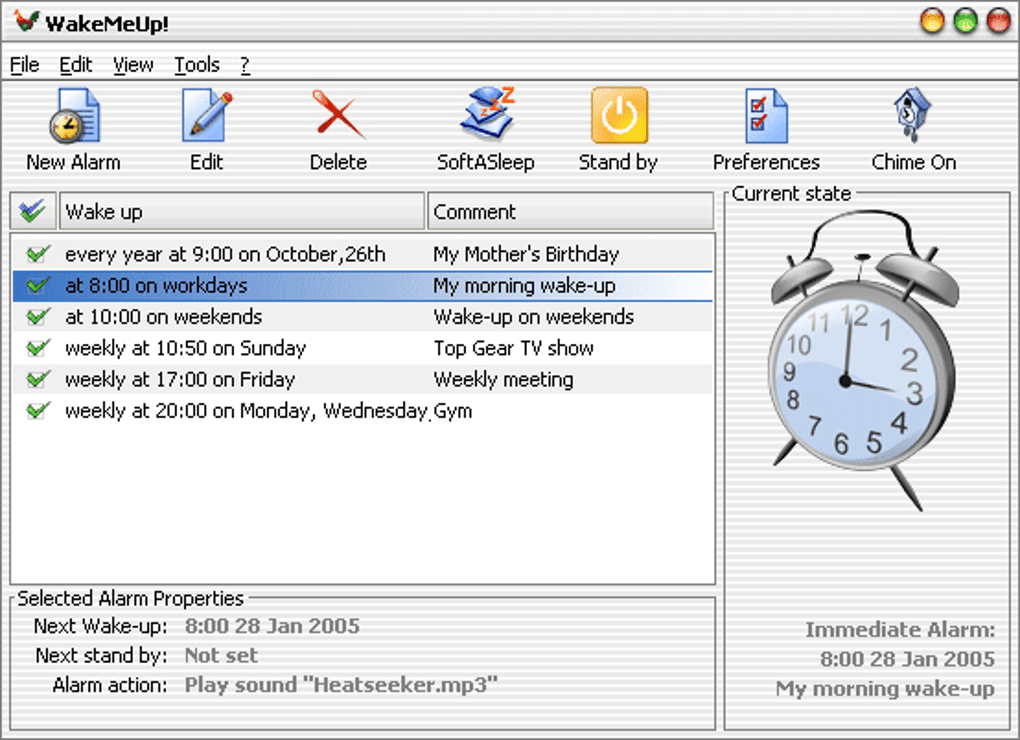

Download WakeMeUp! – Free Alarm Clock Software for Windows with Music Wake-Up
WakeMeUp! is a lightweight, no-frills alarm clock application designed to help you wake up to your favorite music. This free software, available exclusively for Windows, has been a trusted companion for millions of users since its release in 2006. With a minimal footprint and simple interface, WakeMeUp! ensures you never miss your morning alarm again.
Whether you're in Bangladesh or anywhere else, this reliable tool delivers a personalized wake-up experience by playing your preferred songs, playlists, or audio files. Its compatibility with older Windows systems like Windows 95 makes it a unique choice for users still running legacy software. Despite its age, WakeMeUp! remains a popular productivity tool, especially in regions where lightweight apps are preferred.
Key Features of WakeMeUp!
- Music-Based Alarm System: Wake up to your favorite songs instead of harsh beeps. Choose any audio file from your library—MP3s, WAVs, or playlists—to create a pleasant morning routine.
- Lightweight & Fast: At just a few MB, WakeMeUp! uses minimal system resources, making it ideal for older or low-spec Windows machines.
- Simple, Intuitive Interface: The clean layout allows quick setup of alarms, time selection, and music choice without any learning curve.
- Customizable Wake-Up Schedule: Set multiple alarms with different days of the week, repeat options, and snooze functions for flexible routines.
- Compatibility with Legacy Systems: Works seamlessly on Windows 95, 98, ME, 2000, XP, and later versions—perfect for users who haven’t upgraded their OS.
- Free to Download & Use: No trial restrictions or hidden costs. The full version is available at no charge, making it accessible to all users.
Installation & Usage Guide
Getting started with WakeMeUp! is straightforward and requires no technical expertise. First, download the installer from a trusted source. Since the software is available only for Windows, ensure your system meets the minimum requirements—any version from Windows 95 onward. Once downloaded, run the executable file and follow the on-screen prompts. The installation process takes less than a minute and doesn’t clutter your system with unnecessary files.
After installation, launch WakeMeUp! from your Start menu or desktop shortcut. The main window displays a digital clock, alarm settings, and a music player section. To set your first alarm, click “Add Alarm” and select the desired time. You can assign a specific day or repeat pattern (daily, weekdays, weekends). Then, click “Browse” to select your preferred wake-up track—this could be a favorite playlist, a single song, or even a podcast.
For optimal performance, ensure your audio output device is correctly configured in Windows. WakeMeUp! supports most standard audio formats, including MP3, WAV, and WMA. You can also adjust the volume ramp-up feature, which gradually increases the sound level to avoid startling you awake. The snooze function works like a traditional alarm, allowing you to delay the alarm by 5–10 minutes. With these features, WakeMeUp! offers a personalized, stress-free way to start your day.
Compatibility & System Requirements
One of the standout features of WakeMeUp! is its broad compatibility with older Windows operating systems. Unlike many modern apps that require Windows 10 or 11, WakeMeUp! runs smoothly on Windows 95, 98, ME, 2000, XP, Vista, and 7. This makes it an excellent choice for users with outdated hardware or those who prefer stable, proven software over flashy new tools.
The software is designed to be lightweight, consuming less than 5 MB of RAM and requiring minimal disk space. This efficiency ensures it doesn’t slow down older machines or interfere with other applications. Because it’s written in native Windows code, it integrates well with system audio services and doesn’t require additional runtime libraries.
While WakeMeUp! is exclusively for Windows, its simplicity and reliability have made it a favorite in regions like Bangladesh, where users often rely on older systems due to cost or infrastructure limitations. Although there’s no official mobile version for Android or iOS, the desktop app remains a viable alternative for those seeking a secure, free, and functional alarm tool. For users who want to keep their digital life simple and effective, WakeMeUp! delivers exactly that—no bloat, no ads, just a reliable wake-up experience.
Pros & Cons
Pros
- Free and Ad-Free: No hidden fees or intrusive ads—just pure functionality.
- Extremely Lightweight: Uses minimal system resources, perfect for older computers.
- Music Wake-Up Feature: A unique advantage over standard beeping alarms.
- Supports Legacy Windows Systems: Works on Windows 95 and later, a rare trait today.
- Easy to Use: Intuitive interface with no complicated settings.
Cons
- No Mobile Version: Not available for Android or iOS devices.
- Outdated Design: Interface hasn’t been updated since 2006, lacking modern aesthetics.
- No Cloud Sync: Alarms aren’t saved across devices or backed up.
- Limited Customization: Fewer options compared to modern alarm apps.
- Not Updated Since 2006: No recent security patches or feature updates.
Frequently Asked Questions (FAQ)
Is WakeMeUp! free to download and use?
Yes, WakeMeUp! is completely free to download and use. There are no trial periods, subscription fees, or in-app purchases. The software is distributed as a no-cost tool for personal use.
Does WakeMeUp! work on Windows 10 and Windows 11?
While WakeMeUp! was last updated in 2006, it often runs on Windows 10 and 11 in compatibility mode. However, Microsoft no longer officially supports older software, so performance may vary. For best results, use it on Windows 7 or earlier.
Can I use my own music as an alarm?
Absolutely! One of the best features of WakeMeUp! is the ability to set any audio file—MP3, WAV, or WMA—as your alarm sound. Simply browse your music library and select your preferred track.
Is WakeMeUp! secure to download?
Yes, WakeMeUp! is considered safe to download when obtained from reputable sources. The software has been around for over 15 years with no known malware or security issues. Always download from trusted websites to avoid fake versions.
Why hasn’t WakeMeUp! been updated in so long?
The developer has not released updates since 2006, likely due to lack of maintenance or interest. However, the software remains functional and stable for its intended purpose, especially on older systems.
Conclusion: A Reliable, Free Alarm Clock for Windows Users
Despite its age, WakeMeUp! continues to serve as a dependable, no-nonsense alarm clock for Windows users. Its ability to play your favorite music as an alarm sets it apart from standard timer apps, offering a more pleasant and personalized wake-up experience. The lightweight design and compatibility with older systems make it a smart choice for users who value simplicity and stability over flashy features.
If you're looking for a free, secure, and easy-to-use alarm clock that works without slowing down your PC, WakeMeUp! is worth downloading. While it lacks modern features like cloud sync or mobile access, its core functionality remains unmatched in its niche. Whether you're in Bangladesh or another region, this tool provides a reliable way to start your day on the right note.
Download WakeMeUp! today and transform your morning routine with music you love.







